
Categories, tags, and the broader idea of taxonomies#
If you have ever created a blog, you know that blog posts are usually associated with categories and tags. What are they and what are best practices for their use?
Categories and tags are most common on content-management-driven websites, where content is published continuously and needs to be organized, discovered, and reused over time. For example:
- Blogs and personal sites
- Media and publishing sites
- Knowledge bases and documentation portals
- Research libraries
- Corporate content hubs
In all of these, content is not just pages, it’s a growing body of material that benefits from structure beyond simple navigation menus.
From categories and tags to taxonomies#
Categories and tags are not special in themselves. They are simply two well-known examples of a more general concept called a taxonomy.
What is a taxonomy?#
A taxonomy is:
A structured classification system used to group and relate content based on shared characteristics.
In practical terms, a taxonomy allows you to answer questions like:
- What kind of content is this?
- What themes does it relate to?
- How does it connect to other content?
- How should users browse or filter it?
Taxonomies come from fields like biology, library science, and information architecture, but they are now a core concept in modern web systems.
Why categories and tags became defaults#
Historically:
- Categories emerged as top-level groupings (few, broad, stable)
- Tags emerged as descriptive labels (many, flexible, granular)
They proved so useful that most content management system (CMS) platforms adopted them as defaults.
But conceptually:
- Categories = one type of taxonomy
- Tags = another type of taxonomy
They differ mainly in intent and governance, not in underlying mechanics.
Modern frameworks and “custom taxonomies”#
Modern content frameworks (static and dynamic) generalize this idea.
Instead of hard-coding only “categories” and “tags”, they allow you to define:
- Any number of custom taxonomies
- With custom names, rules, and behaviors
- Applied selectively to different content types
Examples of additional taxonomies might include:
series(multi-part content)topics(curated themes)industriesframeworksuse-casesrolesorperspectives
Each taxonomy:
- Groups content
- Generates its own listing views
- Supports navigation, filtering, and discovery
In other words, categories and tags are conventions, not limitations.
The key idea to internalize#
Categories and tags are just named taxonomies with historical defaults. What matters is not the labels—but the classification intent behind them.
Modern frameworks give you the tools to define:
- How content should be grouped
- How users should explore it
- How ideas connect over time
The discipline lies not in adding taxonomies, but in knowing when a new lens genuinely improves understanding.
That’s the difference between a blog archive and a durable knowledge system.
Back to the diference between categories and tags#
When using tools like Wordpress or Hugo for a websites, tags and categories are both taxonomies serving different strategic purposes.
The short version#
Categories = broad buckets
- High-level themes
- Few in number
- Usually 1 (maybe 2) per post
Tags = fine-grained descriptors
- Specific topics, ideas, tools
- Many in number
- Often 5–10+ per post
Think of it like this:
Categories answer: “What kind of content is this?” Tags answer: “What exactly is this about?”
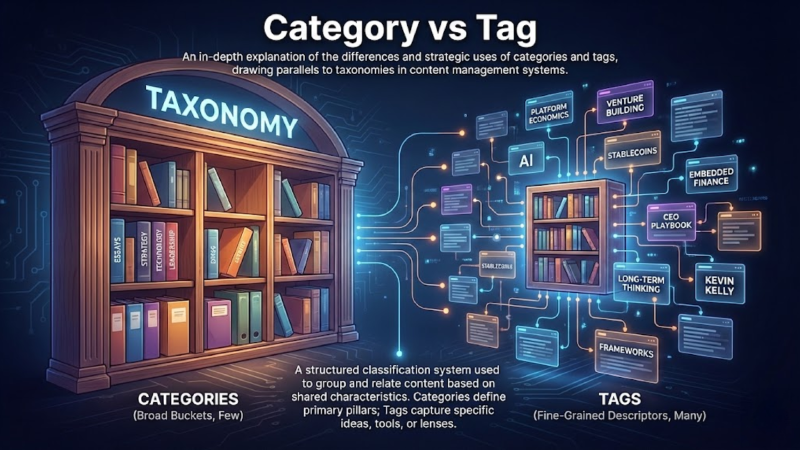
Categories: your site’s macro-structure#
Categories define the primary pillars of your thinking.
For a personal brand site like mine, good categories might be:
EssaysFintechStrategyLeadershipTechnologyEnergy Transition
Rules of thumb
Keep categories stable over years
If you add one every month, you’re doing it wrong
Categories often map to:
- Nav items
- Top-level content sections
- “What I write about” framing
Example post front matter
categories:
  - Strategy
Tags: your semantic graph#
Tags capture specific ideas, tools, or lenses that cut across categories.
Examples from my own site:
embedded-financeplatform-economicsstablecoinsventure-buildingaiceo-playbooklong-term-thinking
Tags are powerful because:
- They enable cross-pollination
- They create a knowledge graph of your thinking
- They age well even as categories stay fixed
Example front matter
tags:
  - platform-economics
  - venture-building
  - long-term-thinking
  - kevin-kelly
A practical mental model (very useful)#
Use this decision test:
- If someone asks “What kind of writer are you?” → Category
- If someone asks “What ideas do you explore?” → Tags
Or:
- Categories = bookshelf labels
- Tags = index entries
SEO & discoverability implications#
Categories
- Stronger internal linking
- Clear topical authority
- Useful for cornerstone / evergreen pages
Tags
- Long-tail SEO
- Better content resurfacing
- Encourages deeper session depth (“related posts”)
For personal sites, tags usually do more work than categories.
Common mistakes to avoid#
- ❌ Using tags and categories interchangeably
- ❌ Having 30+ categories
- ❌ One-off categories used once
- ❌ Putting people’s names as categories
- ❌ Treating categories as chronological (that’s what dates are for)
Recommended setup for a personal site#
Categories
- 5–8 max
- Strategic, durable, opinionated
Tags
- Flexible
- Reused intentionally
- Reflect how you think, not generic blog taxonomies
Example (applied)#
For my Kevin Kelly / platform economics post:
categories:
  - Strategy

tags:
  - platform-economics
  - business-models
  - ecosystems
  - kevin-kelly
  - long-term-thinking
That tells both humans and search engines:
- This is strategic thinking
- About platforms, ecosystems, and long-term dynamics